OS-Layer Exam Protection: The Signal a Lockdown Browser Cannot See
A hidden overlay must set an OS-level flag to stay out of screen recordings. That flag is what exposes it. How OS-layer and network enforcement catch what the browser cannot, and what they cannot do.

The most effective cheating tool in a 2026 exam does not hide in a second tab. It sets a flag that tells the operating system to leave it out of screen recordings, then draws answers onto the candidate's screen while the proctor's capture shows nothing. Browser-based proctoring cannot counter this, and not because it is poorly built. It is watching the wrong layer.
Moving enforcement to the operating-system and network layer is what closes the gap, because that is where these tools actually run. This article is specific about the mechanism: which OS-level signal exposes a hidden overlay, how a default-deny network policy handles everything that needs to reach out, where a locally running model is caught instead, and the limits of the whole approach. OS-layer exam protection is a precise claim, not a slogan, and it is worth understanding exactly what it does.
Key Takeaways
- An overlay that hides from screen capture must set an OS-level exclusion flag. That flag is the signal that exposes it, regardless of the tool's name.
- A default-deny network policy resolves only exam-approved destinations, so hosted models, remote-access relays, and second-device pivots all lose the path they depend on.
- A locally loaded model needs no network at all; it is caught by its GPU memory footprint, not by traffic.
- The enclave runs in user-space with no kernel driver, deploys in about 30 seconds, and removes itself at session end.
- Detection targets techniques, not process names, and it does not replace identity verification.
Table of Contents
Where Browser Enforcement Ends
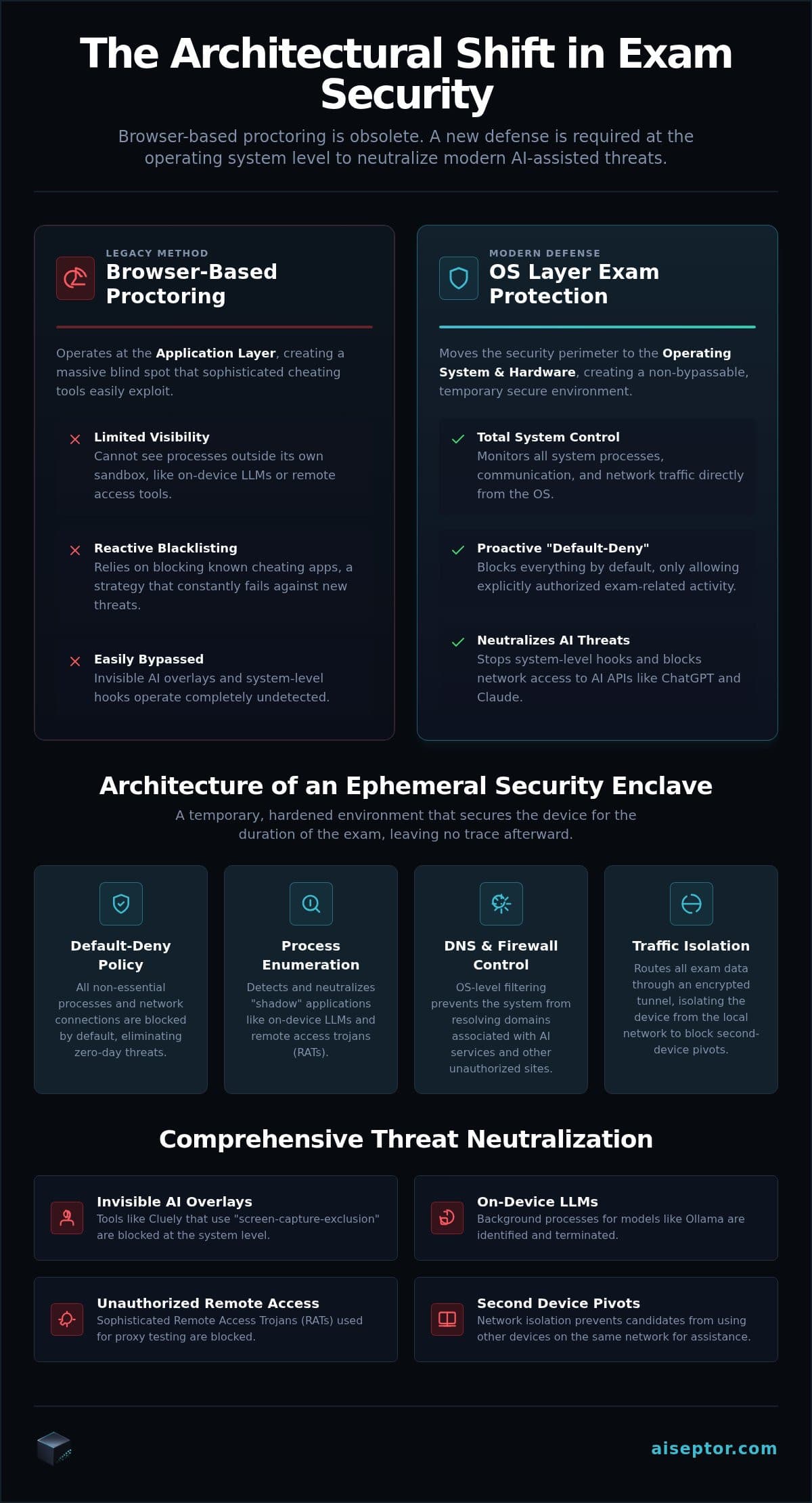
A lockdown browser is a sandboxed application, and the sandbox that makes it safe is also what makes it blind. By design it cannot inspect what else the operating system is running. In ordinary software that isolation is a feature; in a high-stakes exam it is the vulnerability the modern toolkit is built around.
OS-layer exam protection moves the enforcement point out of the browser and into the environment the browser sits in. Instead of asking one application to police itself, the session runs inside a temporary environment that can see the OS-level signals a browser is forbidden from reading, and that controls the network path the browser has no authority over. The two halves matter equally, and the rest of this article takes them in turn.
The Flag That Exposes a Hidden Overlay
An invisible overlay works by asking the operating system to omit its window from screen-capture and recording APIs. On Windows the mechanism is the WDA_EXCLUDEFROMCAPTURE window-display affinity flag; macOS has an equivalent window sharing setting. Legacy proctoring relies on those same capture APIs to watch the candidate, so an overlay that sets the flag is invisible to the proctor by construction. The candidate sees the assistance; the recording shows a clean screen.
The flag is also the tool's undoing. An overlay that drops it to avoid detection reappears in the recording and stops being useful, so it cannot simply hide the fact that it is hiding. Enforcement below the browser queries the window state directly and looks for windows carrying that exclusion flag, which catches the technique no matter what the process is named. That last point matters: a name-based blocklist is defeated by a recompiled fork within the hour, so detection has to key on the technique rather than the identity. The category is covered in the invisible AI overlay entry.
Detecting Cluely by Signal, Not by Name
Cluely is the best-known overlay, and it is a useful illustration of the method rather than a customer story. A browser-trapped tool waits for a visual cue that never arrives, because the overlay excluded itself from capture. Enforcement at the OS layer instead watches for the window-creation event and the exclusion-flag request that the overlay cannot avoid making, and pairs that with blocking the network path it needs to reach a model. The full approach is on detecting Cluely. There is no behavioral guesswork involved: the signal is a concrete request to the operating system.
The Local-Model Case
A model running on the candidate's own machine, such as a local Ollama instance, is the honest exception to any network-based approach. Once loaded it needs no outbound traffic, so filtering will not see it. What it cannot avoid is occupying GPU memory, and a memory footprint consistent with a resident model is the signal that identifies it. It is worth stating plainly, because a vendor who claims network enforcement alone stops local inference is describing something that does not follow from how local inference works.
The Network Half of the Defense
OS-level visibility handles what is running; network policy handles where anything can reach. The enclave routes the session through a per-session tunnel and enforces a default-deny access list at the OS network stack: only the assessment platform and resources the exam policy explicitly allows will resolve. Everything else fails before a connection opens. The design is detailed on network-layer exam security.
That single policy covers several attacks at once. A hosted model cannot be reached, so a cloud AI assistant returns nothing. A remote-access relay cannot open, so a proxy tester using AnyDesk, TeamViewer, or a commodity RAT cannot take control and a local agent cannot phone home. A second device on the candidate's network cannot be used as an answer channel if the primary machine cannot route to an AI service to begin with. The specifics of the second-device case are in blocking second-device pivots. For proxy rings that wrap a remote operator in an anti-detection virtual machine, device fingerprinting adds a second gate: virtualization artifacts fire a hard signal and the session is refused before the first question loads.
Deploying It, and Its Limits
The usual cost of OS-level control is an invasive kernel-mode driver, the kind that runs at Ring 0, destabilizes machines, and leaves a permanent attack surface behind. OS-layer exam protection here does not work that way. The enclave executes in user-space, controls system-level communication for the duration of the session, and removes itself completely when the exam ends. No kernel driver, no persistent agent, nothing left on the device.
Integration is a REST call: create a session, send the candidate to the enclave, and receive HMAC-signed webhooks on completion, with no polling. Most integrations are running in production in under a business day. Pricing is usage-based and billed per session, with no seat minimums and no long-term licensing, so cost tracks assessment volume. The embedding model is on Aiseptor for assessment platforms, and full endpoint detail is on the developer docs.
The limits are worth stating as plainly as the capabilities:
- It is not identity verification. Securing the environment and confirming who is sitting the exam are separate jobs, and this handles only the first.
- No webcam, microphone, keystroke logging, or screen recording. The enclave collects network-access signals and device-activity metadata, and that is the entire footprint.
- Detection is technique-based, not a process-name scan. That is a strength against renamed tools, but it means the design leans on specific, hard-to-discard signals rather than an exhaustive inventory of everything running.
- A local model is caught by GPU evidence, not the network. The two signals cover different attacks; neither substitutes for the other.
Retention is 24 hours by default, the design is GDPR- and CCPA-compliant, and a SOC 2 Type II audit is in progress, targeted for Q3 2026. The short version: move enforcement to the layer where the tools actually run, key detection on the signals those tools cannot discard, and be honest that identity remains a separate control.
Frequently Asked Questions
How does OS-layer protection differ from a standard lockdown browser?
A lockdown browser is a sandboxed application that can only enforce policy inside its own process; it cannot inspect other processes or control the network stack. OS-layer enforcement runs outside the browser, so it can read the OS-level signals a hidden overlay produces and apply a default-deny policy to what the device can reach. The practical difference shows up with any tool that runs alongside the browser rather than inside it.
Is it compatible with Mac and Windows?
Yes, on both. The specific signals differ by platform because the operating systems differ: the screen-capture-exclusion mechanism an overlay must use has a Windows form and a macOS form, and detection accounts for each. The enforcement model, a per-session enclave applying a default-deny network policy, is the same on both.
Does it require candidates to install permanent software?
No. The enclave is ephemeral. It launches when the exam starts, runs in user-space with no kernel driver, and removes itself when the session ends, leaving nothing on the machine. That is a deliberate contrast with driver-based tools that require permanent system changes and leave a lasting attack surface.
Can it detect AI tools like ChatGPT or Cluely?
For a hosted service like ChatGPT, the default-deny network policy prevents the device from reaching the AI endpoint, so the tool returns nothing. For a hidden overlay like Cluely, detection keys on the screen-capture-exclusion flag the overlay must set to stay out of the recording. The two mechanisms address the two different ways those tools work.
How does the usage-based pricing work?
Billing is per assessment session actually conducted, with no seat minimums and no long-term contract, so cost tracks volume rather than a fixed forecast. Integration is via REST API and most platforms are in production in under a business day. It is structured as a security utility you scale up or down with your assessment load.
Frequently Asked Questions
How does OS-layer protection differ from a standard lockdown browser?
A lockdown browser is a sandboxed application that can only enforce policy inside its own process; it cannot inspect other processes or control the network stack. OS-layer enforcement runs outside the browser, so it can read the OS-level signals a hidden overlay produces and apply a default-deny policy to what the device can reach. The practical difference shows up with any tool that runs alongside the browser rather than inside it.
Is it compatible with Mac and Windows?
Yes, on both. The specific signals differ by platform because the operating systems differ: the screen-capture-exclusion mechanism an overlay must use has a Windows form and a macOS form, and detection accounts for each. The enforcement model, a per-session enclave applying a default-deny network policy, is the same on both.
Does it require candidates to install permanent software?
No. The enclave is ephemeral. It launches when the exam starts, runs in user-space with no kernel driver, and removes itself when the session ends, leaving nothing on the machine. That is a deliberate contrast with driver-based tools that require permanent system changes and leave a lasting attack surface.
Can it detect AI tools like ChatGPT or Cluely?
For a hosted service like ChatGPT, the default-deny network policy prevents the device from reaching the AI endpoint, so the tool returns nothing. For a hidden overlay like Cluely, detection keys on the screen-capture-exclusion flag the overlay must set to stay out of the recording. The two mechanisms address the two different ways those tools work.
How does the usage-based pricing work?
Billing is per assessment session actually conducted, with no seat minimums and no long-term contract, so cost tracks volume rather than a fixed forecast. Integration is via REST API and most platforms are in production in under a business day. It is structured as a security utility you scale up or down with your assessment load.