How to Stop Unauthorized Remote Desktop Access: A Clinical Security Guide
By Aiseptor Team · July 8, 2026

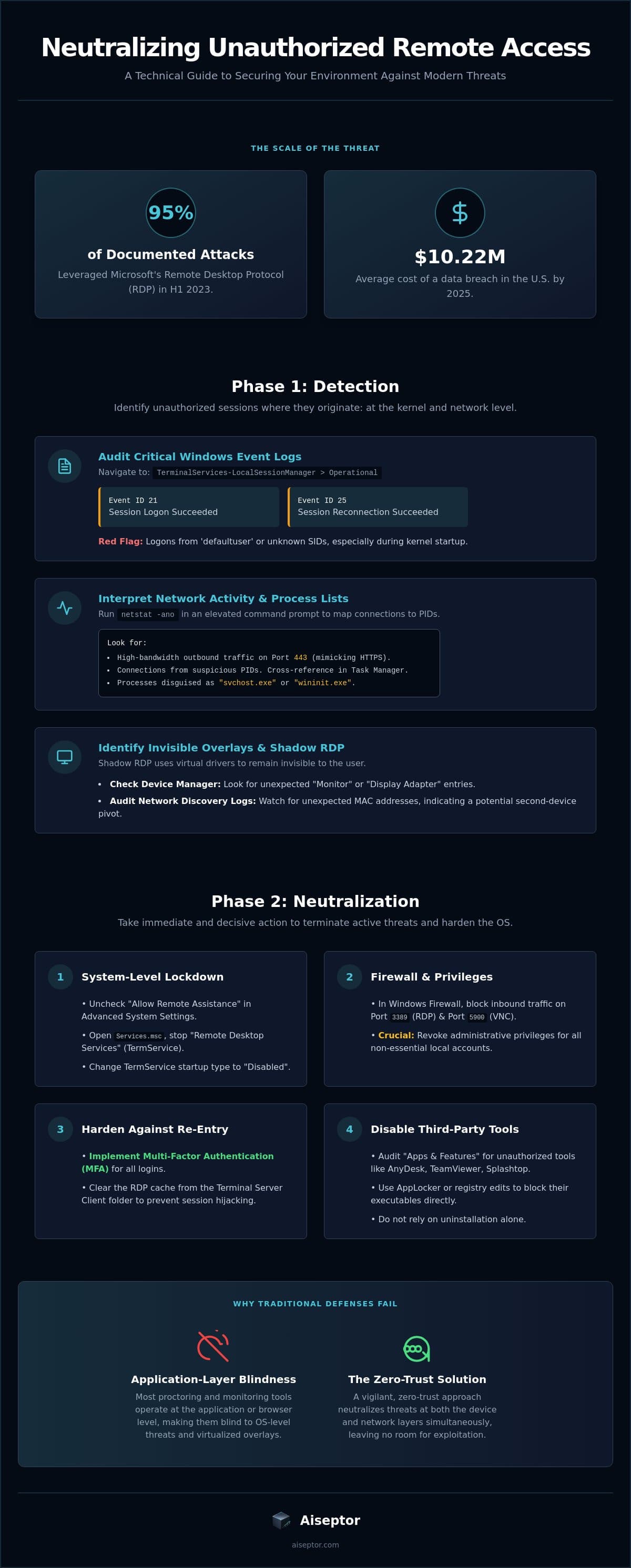
Attackers leveraged Microsoft’s Remote Desktop Protocol in 95% of documented attacks during the first half of 2023. By 2025, the average cost of a data breach in the United States reached a record $10.22 million. These figures represent a systemic failure in legacy security models. You likely suspect that your current monitoring tools are blind to the shadow remote access tools (RATs) and invisible AI overlays bypassing your OS-level defenses. Most proctoring solutions fail because they operate at the wrong layer of the stack.
This clinical guide provides the precise technical steps to stop unauthorized remote desktop access by neutralizing threats at the architectural level. You'll learn how to detect persistent background processes, block unauthorized protocols, and secure your environment against lateral movement. We'll move from high-level threat identification to granular implementation details. This article provides the definitive roadmap to identify, block, and permanently neutralize unauthorized remote tools. The objective is total security integrity through a vigilant, zero-trust approach that leaves no room for exploitation.
Key Takeaways
- Audit critical Windows Event Viewer logs to identify unauthorized session initiations and unknown SID entries at the kernel level.
- Execute immediate administrative actions to stop unauthorized remote desktop access by terminating the 'TermService' process and disabling legacy Remote Assistance protocols.
- Analyze the failure of application-layer proctoring against modern shadow AI and overlays that reside above the browser stack.
- Deploy ephemeral security enclaves to neutralize Remote Access Tools (RATs) and AI overlays at both the device and network layers simultaneously.
How to Detect Unauthorized Remote Desktop Sessions
Detection is the first failure point. Most security teams rely on surface-level alerts while kernel-level intrusions go unnoticed. To stop unauthorized remote desktop access, you must look where the OS records the truth. Start by auditing the Windows Event Viewer. Navigate to the path: Applications and Services Logs > Microsoft > Windows > TerminalServices-LocalSessionManager > Operational. Focus on two critical indicators:
- Event ID 21: Remote Desktop Services: Session logon succeeded.
- Event ID 25: Remote Desktop Services: Session reconnection succeeded.
Identify 'defaultuser' or unknown Security Identifiers (SIDs) initiating these events. In 77% of RDP-based attacks, compromised credentials are used for lateral movement. If you see logon notifications occurring during kernel startup before a legitimate user has authenticated, the system is likely compromised by a persistent RAT.
Interpreting Network Activity and Process Lists
Run an elevated command prompt and execute netstat -ano. This command maps every active network connection to a specific Process ID (PID). While standard RDP traffic utilizes Port 3389, modern RATs often tunnel through Port 443 to mimic HTTPS traffic. Identify high-bandwidth outbound traffic originating from unknown .exe files. Cross-reference these PIDs in Task Manager. Attackers frequently disguise malicious binaries with names like "svchost.exe" or "wininit.exe" to blend into the background process stack.
Identifying Invisible Overlays and Shadow RDP
Legacy proctoring tools are often blind to OS-level remote control. Shadow RDP sessions frequently utilize virtual display drivers to facilitate remote viewing without triggering standard UI warnings. Open Device Manager and verify if any unexpected "Monitor" or "Display Adapter" entries exist. These virtual drivers allow an attacker to see everything while remaining invisible to the user. Additionally, audit local network discovery logs. A second-device pivot-where a mobile device or bridge hardware is used to bypass network-layer exam security-will appear as an unexpected MAC address or bridge connection in your local arp tables. If these signatures exist, your environment is no longer secure.
Immediate Steps to Block and Neutralize Remote Access
Detection is useless without immediate neutralization. If your audit confirms a breach, you must move down the stack to kill the connection. Start at the system level. Navigate to Advanced System Settings. Uncheck "Allow Remote Assistance connections to this computer." This prevents the OS from accepting unsolicited invitations. Next, open Services.msc. Locate "Remote Desktop Services" (TermService). Stop the service. Change the startup type to "Disabled." This is the only way to hard-kill the listener at the service level.
Modify the Windows Firewall immediately. Block inbound traffic on Port 3389 (RDP) and Port 5900 (VNC). Be aware: firewalls are a weak defense. Modern RATs often use outbound-initiated tunnels to bypass inbound rules entirely. To truly stop unauthorized remote desktop access, you must revoke administrative privileges for all non-essential local accounts. Without admin rights, most unauthorized tools cannot establish the persistent hooks required for long-term access. If you are managing high-stakes environments, you should test your current defenses against persistent RATs using specialized security enclaves.
Hardening the OS Layer Against Re-Entry
Identity is the new perimeter. Implement Multi-Factor Authentication (MFA) for every login. Microsoft's April 2026 updates (KB5082200) introduced enhanced warnings for RDP files, but manual hardening remains critical. Clear the RDP cache located in the Terminal Server Client folder. This prevents session hijacking via cached credentials. In 2026, 31% of data breaches started with software vulnerabilities, surpassing stolen passwords. MFA is your only reliable buffer against credential-based re-entry.
Disabling Third-Party Remote Access Tools
Attackers don't always use RDP. They leverage AnyDesk, TeamViewer, or Splashtop. Open "Apps and Features." Sort by "Date Installed." Any remote tool installed without an explicit administrative ticket is a threat. Neutralize these by blocking their executables at the registry level or using AppLocker. This prevents the binary from executing even if the service is restarted by a malicious script. Do not rely on uninstallation alone; persistent threats often leave behind hidden background processes that may require professional IT support from Aspire Computing to fully identify and remove.
Why Application-Layer Blocking Fails Against Modern Threats
Legacy security models rely on the application layer. This is a tactical failure. Standard antivirus scans for known malware signatures. It cannot stop unauthorized remote desktop access when the intruder leverages "legitimate" tools like AnyDesk or custom shadow AI overlays. These threats reside above the browser stack. They are invisible to mainstream detection tools. By failing to address the network layer, organizations cannot effectively stop unauthorized remote desktop access during high-stakes hiring or certification exams.
Outbound-initiated remote sessions render traditional inbound firewall rules obsolete. Traditional defenses monitor incoming requests. Modern RATs, however, initiate connections from the host to an external command-and-control server. The firewall identifies this as standard outbound traffic. It permits the breach. As of May 2026, 1.6 million Virtual Network Computing (VNC) servers remain exposed globally. Total lockdown requires moving deeper into the stack. Kernel-level drivers are necessary for a definitive lockdown, even if they are perceived as invasive for BYOD. Without them, you cannot verify the integrity of the hardware-software handshake.
The Vulnerability of Browser-Based Proctoring
Browser extensions operate within a restricted sandbox. They cannot detect OS-level protocols or background processes mimicking system utilities. If an attacker uses a 'Cluely' style overlay, browser-based tools remain blind. This technical gap explains The Obsolescence of Browser-Based Proctoring. You aren't securing the session; you're just watching the window.
Detecting Second-Device Pivots
Sophisticated actors use capture cards or network bridges to bypass local security entirely. These pivots allow a second device to mirror the primary display without triggering software alerts. You must block second device pivots by analyzing network-layer signatures. If your security doesn't see the bridge, the session is compromised. To identify these blind spots in your own environment, audit your network layer integrity now.
Preventing Remote Access Fraud in Assessments and Hiring
High-stakes assessments are currently in a state of crisis. Legacy proctoring solutions focus on video feeds and eye-tracking while ignoring the architectural vulnerabilities of the operating system. To effectively stop unauthorized remote desktop access during a certification or hiring event, you must deploy ephemeral security enclaves. These environments exist only for the duration of the assessment. They leave no trace afterward. This approach neutralizes RATs and AI overlays at both the device and network layers simultaneously. It's a surgical strike against fraud.
Shift your strategy from behavioral monitoring to hard-layer integrity enforcement. Watching a candidate's webcam doesn't stop a remote expert from controlling the cursor via a hidden RDP session. You need a system that invalidates the connection before the first question is rendered. Integration is direct and methodical. Modern platforms utilize a REST API to trigger these security enclaves, ensuring a frictionless experience for legitimate users while maintaining a total lockdown on unauthorized protocols. The goal is a clean environment where the hardware-software handshake is verified in real-time.
Implementing Network-Layer Exam Security
Aiseptor operates at a deeper tier than standard browser-based tools. It identifies and blocks remote-access tools at the network layer without the need for invasive kernel drivers. This is critical for BYOD environments where privacy and system performance are paramount. You must detect Cluely AI overlays and similar shadow tools that bypass the application layer entirely. If you aren't monitoring the network-layer handshake, you aren't securing the exam. You're just recording the breach.
The Clinical Approach to Integrity
The industry is moving toward a no-nonsense, usage-based security model. Security shouldn't be a permanent burden on the user's machine; it should be a temporary, high-strength intervention. This clinical approach ensures that the integrity of your assessment remains absolute without compromising user hardware. It's time to replace failing legacy solutions with a vigilant, specialist-driven architecture. Neutralize remote access threats-Try Aiseptor for free to stop unauthorized remote desktop access and reclaim the integrity of your hiring pipeline.
Securing the Network Layer for Total Integrity
The current security landscape is in a state of crisis. Application-layer tools are fundamentally insufficient. Relying on browser extensions or standard firewalls leaves your environment vulnerable to shadow RATs and outbound-initiated tunnels. To effectively stop unauthorized remote desktop access, you must enforce hard-layer integrity. This requires moving beyond simple behavioral monitoring and into the realm of architectural neutralization. You've identified the kernel logs and service vulnerabilities. Now, you must automate the defense.
Aiseptor provides the clinical intervention required for high-stakes assessments. It blocks invisible AI overlays at the network layer. Deployment is seamless via REST API. There's no long-term commitment required for these ephemeral security enclaves. You can secure your hiring pipeline without the friction of invasive kernel drivers or legacy proctoring baggage. It's time to close the industry's most critical blind spot. Take the first step toward absolute session integrity today. Stop unauthorized remote access in high-stakes assessments, Try Aiseptor Free. Your integrity is worth the specialist's touch.
Frequently Asked Questions
How can I tell if someone is currently controlling my computer?
Identify unauthorized control by monitoring for erratic cursor movement, windows opening without input, or unexpected software appearing in your taskbar. Technical indicators include high outbound bandwidth usage and active listeners on Port 3389 or Port 5900. Use the command netstat -ano to map active connections to unknown Process IDs. If you see an established connection to an external IP you don't recognize, your system's integrity is compromised.
Will a factory reset stop all unauthorized remote access?
A factory reset clears the OS layer but it's not a guaranteed fix for sophisticated intrusions. While it removes most application-layer RATs, it cannot neutralize threats that have achieved UEFI or BIOS-level persistence. Attackers frequently use these deep-layer hooks to re-infect a system immediately after the OS is reinstalled. To ensure a total lockdown, you must flash the firmware and verify the hardware-software handshake at the kernel level.
Can someone remotely access my computer if it is turned off?
Remote access is technically impossible if the machine is completely powered down and disconnected from a power source. However, if the computer is in "Sleep" or "Hibernate" mode and Wake-on-LAN (WoL) is enabled in the BIOS, an attacker can trigger a startup. Advanced management technologies like Intel vPro or AMT also allow for out-of-band management even when the primary OS is not running. Always disable WoL in high-security environments.
Why didn't my antivirus detect the remote desktop tool?
Antivirus engines focus on malicious signatures, but many remote tools are "dual-use" grayware. Software like AnyDesk, TeamViewer, and Splashtop are signed with valid digital certificates. They aren't technically malware, so application-layer scanners permit them to run. Attackers exploit this blind spot by using legitimate binaries to bypass your defenses. To stop unauthorized remote desktop access, you must move beyond signature-based detection and enforce network-layer protocol blocking.
What is the difference between RDP and a RAT?
RDP is a specific proprietary protocol developed by Microsoft for legitimate remote administration. A RAT (Remote Access Trojan) is a broader category of tools designed for stealthy, often unauthorized, control of a host. While RDP is a visible service, RATs often hide within background processes and use outbound-initiated tunnels to bypass firewalls. Both require a clinical, multi-layered strategy to stop unauthorized remote desktop access and maintain session integrity in high-stakes environments.