Stop Exam Content Theft: A Technical Guide for 2026
Where exam items actually leak on a candidate device in 2026, which capture paths a network-layer enclave closes, and which it honestly does not.

The Talview 2026 AI Threat Index puts 88% of online assessments at active risk from AI-assisted cheating. The same tooling that answers a question on screen can also read it, store it, and forward it.
That second use is the one certification bodies underestimate. A candidate who cheats damages one score. A candidate whose machine quietly harvests your item bank damages every future sitting of that exam. This guide covers where items actually leak on a candidate device in 2026, which of those paths a network-layer enclave closes, and which it does not.
Key Takeaways
- Item theft and answer assistance now run on the same tools: an invisible overlay that reads the screen can archive it just as easily.
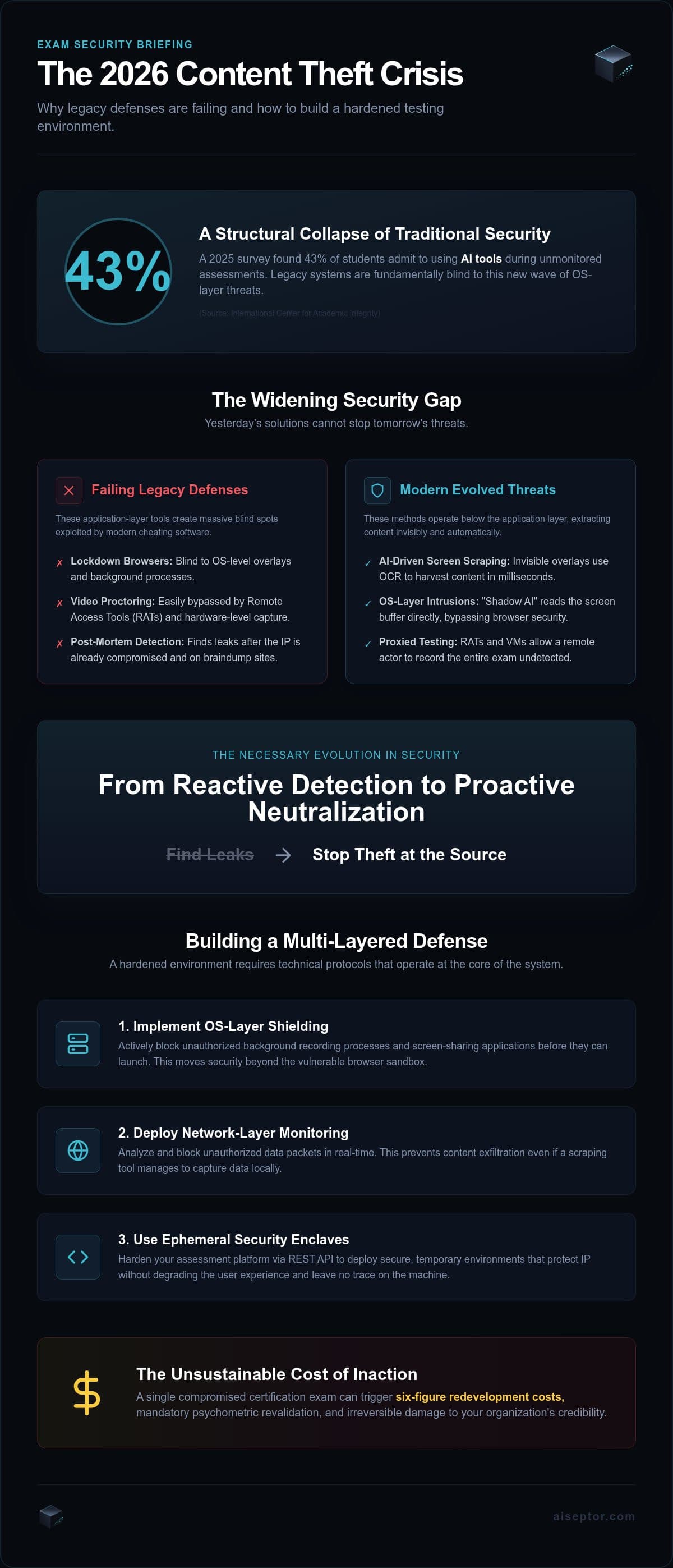
- Lockdown browsers sit at the application layer, so an overlay, an on-device model, or a host OS recording a guest VM is outside what they can observe.
- Network-layer enforcement closes the exfiltration path rather than hunting binaries, which is what makes it hold against recompiled and renamed forks.
- Some capture paths are genuinely out of reach of any software running on the candidate device. Plan for them explicitly instead of buying a product that claims otherwise.
How exam content actually leaks
Items leave a session through one of four paths, and only two of them involve the browser at all.
The first is an invisible AI overlay. It draws itself on top of the exam window and sets an OS-level screen-capture-exclusion flag so it stays absent from anything a proctor or a recording would see. It reads pixels, not the DOM, so copy-paste blocks and right-click handlers are irrelevant to it.
The second is an on-device language model. It runs locally in memory, reads the screen, and produces no outbound traffic to intercept once the weights are on disk.
The third is a remote-access tool. A second operator drives the machine from elsewhere and records what they see. The candidate sits on camera the whole time, which is why webcam review does not catch it.
The fourth is virtualization. The exam runs inside a guest VM while the host operating system records the display. The security software is inside the box it is meant to be watching.
Why lockdown browsers miss all four
A lockdown browser controls one window. It can disable copy-paste, block new tabs, and refuse to run when a known process is present. None of that reaches a process that never touches the browser. As we cover in more depth on secure exam browsers, the sandbox that makes a browser safe is the same boundary that blinds it to the rest of the machine.
Process-name signatures do not close the gap either. Renaming an overlay binary or recompiling an open-source fork defeats a name-matching rule in minutes, and the forks recompile faster than signature lists update.
What network-layer enforcement closes
The durable control is the network path, because every one of these tools except the local model depends on reaching something.
Aiseptor establishes a short-lived encrypted tunnel from the candidate device at session start and enforces a default-deny access policy at the operating-system level. Only the assessment platform and resources the exam policy names explicitly resolve. The ephemeral enclave deploys in about 30 seconds, needs no kernel driver and no admin rights, and destructs in about 10 seconds at session end.
Remote-access tools are handled by starvation rather than termination, and the distinction matters. AnyDesk, TeamViewer, and custom RAT builds keep running on the candidate machine. They are simply cut off from the internet, so the operator on the far end watches a frozen screen. Nothing is killed, which means nothing has to be identified by name first.
The signals the agent looks for
Detection targets techniques, not binaries. Three signals do most of the work: the screen-capture-exclusion flag an overlay has to set in order to hide, GPU VRAM deltas consistent with a model loaded locally, and DNS or SNI requests to AI inference endpoints. Device fingerprinting across CPU instruction timing, GPU memory topology, and virtualization artifacts fires a hard signal on nested and anti-detection VMs, and the session is refused before the first item renders.
Because these are properties of the method rather than the product, a fork nobody has seen before trips the same signal as the version that shipped last year. The network-layer approach and our writeup on detecting Cluely-class overlays go through the mechanics in detail.
What this approach does not do
Several capture paths survive this design, and a vendor who tells you otherwise is selling you a number they cannot back.
A hardware capture card sitting between the GPU and the monitor generates no network traffic and no process. Nothing running on the candidate operating system can see it. The same is true of a phone on a tripod pointed at the screen. These are physical-access problems, and the honest mitigations are item randomization, large item pools, and rotating forms, not software.
An on-device model that already has its weights on disk needs no network. The VRAM-delta signal is what catches it, and that is a signal rather than a block.
Aiseptor also does not use a webcam, a microphone, keystroke logging, screen recording, or biometrics, and does not run behavioural or AI-anomaly scoring. It collects network-access signals and device-activity metadata, held 24 hours by default. That is a deliberate privacy tradeoff, and it means identity assurance is a separate control you still need. Virtualization is caught by the device-fingerprinting signals described above and by nothing beyond them.
Finally, no configuration of this stops every form of AI-assisted cheating. What it does is remove the cheap, scalable paths and push the remaining ones into territory that costs real money and physical setup.
Integrating it without rebuilding your platform
Integration is a REST call, not an architecture project. POST /api/v1/sessions with the candidate and exam details returns a session_id and an onboarding_url you hand to the candidate. Session lifecycle events arrive as HMAC-SHA256-signed webhooks, so there is nothing to poll. Most integrations are running in production in under a business day. The developer documentation is the reference for fields and auth.
Billing is per session with no seat minimums and no long-term licensing, which matters when volume is seasonal. The first 5 sessions are free without a card. Assessment platforms and certification bodies have separate integration notes, and a SOC 2 Type II audit is in progress, targeted Q3 2026.
If you want to see which of the four paths your current stack leaves open, run a session against your own environment.
Frequently Asked Questions
Can you completely stop exam screen recording?
No, and treat any vendor claiming otherwise with suspicion. Software-based recording that depends on network access can be cut off, and overlays that hide via the screen-capture-exclusion flag can be flagged by that flag. A hardware capture card between the GPU and the monitor, or a phone camera pointed at the screen, produces no process and no traffic, so no software on the candidate machine can observe it. Those are addressed through item pool design, not endpoint tooling.
How do invisible AI overlays read exam content without being flagged?
They set an OS-level screen-capture-exclusion flag, the same mechanism a legitimate application uses to keep a password field out of a screen share. That makes them absent from screen captures a proctor or a recording would see. They read the rendered screen rather than the page, so browser-level controls like copy-paste blocking never fire. The exclusion flag itself is the signal worth detecting, because an overlay has to set it to stay hidden.
What is the difference between a lockdown browser and an ephemeral enclave?
A lockdown browser is an application that restricts one window and runs inside the candidate's normal operating system, so anything outside that window is invisible to it. An ephemeral enclave is a session-scoped boundary applied at the OS and network layer: a default-deny access policy covering the whole device, active only for the duration of the assessment, removed completely afterwards with no kernel driver and no persistent install.
Does network-layer enforcement catch a second device?
It covers second devices that need the same network, including a phone tethering AI traffic or a remote operator connecting in, because the default-deny policy applies across network interfaces rather than to one browser window. It does not cover a fully independent second device on its own connection, such as a phone on cellular data being read by the candidate. That is a proctoring and room-integrity problem rather than a network one.
Does Aiseptor need a kernel driver or admin rights?
Neither. The agent runs in user space, deploys in roughly 30 seconds, and removes itself in about 10 seconds when the session ends. There is no persistent service and no residual configuration on the device. It uses no webcam, microphone, keystroke logging, or screen recording, and retains network-access and device-activity metadata for 24 hours by default.
Frequently Asked Questions
Can you completely stop exam screen recording?
No, and treat any vendor claiming otherwise with suspicion. Software-based recording that depends on network access can be cut off, and overlays that hide via the screen-capture-exclusion flag can be flagged by that flag. A hardware capture card between the GPU and the monitor, or a phone camera pointed at the screen, produces no process and no traffic, so no software on the candidate machine can observe it. Those are addressed through item pool design, not endpoint tooling.
How do invisible AI overlays read exam content without being flagged?
They set an OS-level screen-capture-exclusion flag, the same mechanism a legitimate application uses to keep a password field out of a screen share. That makes them absent from screen captures a proctor or a recording would see. They read the rendered screen rather than the page, so browser-level controls like copy-paste blocking never fire. The exclusion flag itself is the signal worth detecting, because an overlay has to set it to stay hidden.
What is the difference between a lockdown browser and an ephemeral enclave?
A lockdown browser is an application that restricts one window and runs inside the candidate's normal operating system, so anything outside that window is invisible to it. An ephemeral enclave is a session-scoped boundary applied at the OS and network layer: a default-deny access policy covering the whole device, active only for the duration of the assessment, removed completely afterwards with no kernel driver and no persistent install.
Does network-layer enforcement catch a second device?
It covers second devices that need the same network, including a phone tethering AI traffic or a remote operator connecting in, because the default-deny policy applies across network interfaces rather than to one browser window. It does not cover a fully independent second device on its own connection, such as a phone on cellular data being read by the candidate. That is a proctoring and room-integrity problem rather than a network one.
Does Aiseptor need a kernel driver or admin rights?
Neither. The agent runs in user space, deploys in roughly 30 seconds, and removes itself in about 10 seconds when the session ends. There is no persistent service and no residual configuration on the device. It uses no webcam, microphone, keystroke logging, or screen recording, and retains network-access and device-activity metadata for 24 hours by default.