Secure Remote Assessment Architecture: Defending Integrity at the Network Layer
A lockdown browser secures one window; the tools defeating it don't run in one. How to architect remote assessment integrity at the OS and network layers, over a REST API, without a kernel driver.


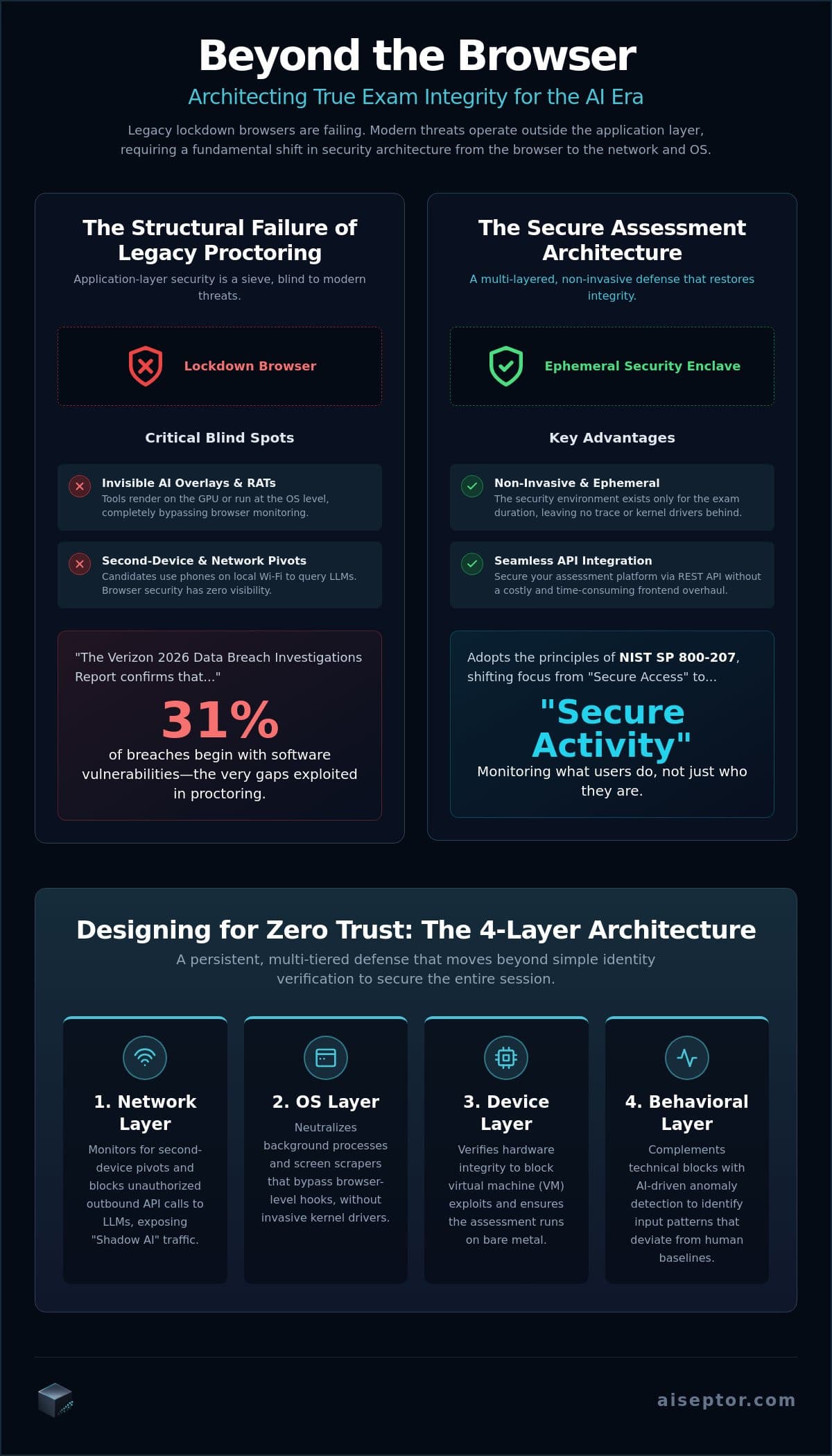
A lockdown browser secures one application window. The tools defeating it now, invisible AI overlays, on-device LLMs, and remote-access relays, don't run in that window at all. According to Talview's 2026 AI Threat Index, 88% of online assessments face an active AI cheating risk, and most of it lives in the gap between what the browser monitors and what the operating system actually executes.
Closing that gap is an architecture problem, not a better-browser problem. This is how a remote assessment stack that defends integrity at the OS and network layers is actually put together: what each layer sees, why an ephemeral enclave beats a kernel driver, and how it integrates over a REST API without rebuilding your platform.
Key Takeaways
- Application-layer proctoring is blind to three things by design: overlays excluded from screen capture, locally-run LLMs, and second-device pivots. All three operate outside the browser sandbox.
- Network-layer enforcement applies a default-deny policy on the candidate's device, so cloud AI endpoints and remote-access relays don't resolve for the duration of the session.
- OS-level signals, not a kernel driver, catch what the network can't see: the screen-capture-exclusion flag an overlay must set, and the GPU memory deltas a local model produces.
- An ephemeral enclave delivers that visibility for the session only, then removes itself, which is what makes the model workable for BYOD candidates who won't install permanent software.
Where Application-Layer Proctoring Fails
A browser operates strictly within its own sandbox and its own DOM. It can't inspect processes running elsewhere on the machine, read the network stack, or query the GPU, restrictions that protect users from hostile websites but also blind any browser-based proctor to everything happening outside the tab. Network-layer exam security exists because that boundary can't be patched from inside the browser.
Three vectors exploit it directly:
- Invisible overlays. An AI overlay like Cluely renders answers on a layer marked excluded from screen-capture APIs. It's invisible to screen recording and to the browser for the same reason: the exclusion flag hides it from anything reading the frame buffer.
- On-device LLMs. A model running locally generates no traffic to a known AI provider, so anything watching only for outbound API calls sees nothing.
- Second-device and remote-access pivots. A relay tool or a tethered phone routes prompts to an external model through a path a lockdown browser has no visibility into.
What Each Layer Actually Sees
A defense that holds has to cover the session, not just the login. Verifying who the candidate is doesn't tell you what's running in the background while they work. Two layers below the browser do that work:
The Network Layer
Aiseptor enforces a default-deny policy on the candidate's device for the duration of the session: only the assessment platform and the resources it explicitly allows are reachable. Cloud AI inference endpoints, remote-access relays, and prompts routed through a tethered second device fail to resolve at the DNS and SNI level, regardless of what the tool sending them is named. This is what closes the "shadow AI" path that browser- and camera-based tools can't see, without decrypting any personal traffic.
The OS Layer
The network can't catch a model running entirely on the candidate's own hardware, so the OS layer covers that case. Aiseptor targets the parts of the technique that don't change when a tool is renamed: the screen-capture-exclusion flag (WDA_EXCLUDEFROMCAPTURE on Windows) that every hiding overlay must set to stay invisible, and GPU VRAM deltas consistent with a locally loaded language model. Name-based detection loses to a recompiled binary within the hour; targeting the technique doesn't.
Why an Ephemeral Enclave Beats a Kernel Driver
OS-level visibility has traditionally meant a kernel driver, which is exactly what makes candidates refuse it: it's permanent, it can destabilize a personal machine, and it's a standing privacy liability. An ephemeral enclave delivers the same visibility without those costs. It deploys in about 30 seconds, runs without a kernel driver, exists only for the session, and removes itself completely afterward, leaving no persistent files or background services behind.
That teardown is what makes the model viable for BYOD assessment, where permanent installation is a non-starter. Aiseptor collects network-access signals and device-activity metadata during the session, not webcam, microphone, or keystroke data, with a default 24-hour retention window. It's GDPR- and CCPA-compliant by design and is currently undergoing a SOC 2 Type II audit, targeted for completion in Q3 2026.
Integrating Over a REST API
The enclave initializes through a single authenticated request at the start of a session: POST /api/v1/sessions returns a URL you redirect the candidate to, and the rest of the session lifecycle arrives as HMAC-signed webhooks, including the integrity verdict at the end. No polling, and no rebuild of your existing assessment UI. The developer quickstart lists the exact request and response fields and a working signature-verification example; most integrations are running in production in under a business day.
The commercial model matches the architecture. Pricing is usage-based and billed per session, with no long-term licensing commitment, so security spend tracks assessment volume instead of a multi-year contract. The first 5 sessions are free.
How This Sits With What You Run
Network- and OS-layer enforcement complements identity verification and video proctoring; it doesn't replace them. Camera-based tools remain the right layer for physical-room anomalies and confirming identity. Aiseptor covers the layer those tools were never built to reach. As AI models keep moving from the cloud onto local hardware, internet-blocking alone stops being enough, which is why the OS-level signals matter as much as the network policy. See how the enforcement works for the full architecture, Aiseptor for assessment platforms for the integration view, or how invisible overlays are detected. You can also request free access to validate it in your own environment.
Frequently Asked Questions
What's the difference between a lockdown browser and a network-layer assessment architecture?
A lockdown browser restricts a single application window: tabs, copy-paste, navigation. A network-layer architecture controls what the candidate's device can reach and reads OS-level signals the browser can't, which is what covers overlays, on-device LLMs, and remote-access pivots that never touch the browser at all.
How does network-layer enforcement handle AI cheating on a second device?
Aiseptor's default-deny policy applies across every interface on the primary device, so a tethered phone or hotspot doesn't create an unmonitored path to an external model. A fully separate device on its own connection is a hardware pivot no policy on the primary machine can block; it's a lower-bandwidth vector best addressed alongside identity checks.
Can it block invisible overlays like Cluely?
Yes, by targeting the screen-capture-exclusion flag the overlay must set to stay hidden, plus the network path a cloud-based overlay needs to reach its backend, rather than matching a specific tool by name. That catches renamed builds and unseen forks the same way it catches the original.
Is it possible to secure remote exams without invasive kernel-level drivers?
Yes. Aiseptor's ephemeral enclave provides OS- and network-level visibility without a kernel driver, exists only for the session, and removes itself afterward, so it avoids the stability and privacy costs that make kernel-level proctoring hard to deploy on personal devices.
How does a REST API-based enclave integrate with an existing assessment platform?
You create a session with a single authenticated POST call that initializes the enclave, then receive session events, including the final integrity verdict, as HMAC-signed webhooks. It embeds as a modular layer without a frontend rebuild, and scales per session. See the developer quickstart for the exact contract.
Frequently Asked Questions
What's the difference between a lockdown browser and a network-layer assessment architecture?
A lockdown browser restricts a single application window: tabs, copy-paste, navigation. A network-layer architecture controls what the candidate's device can reach and reads OS-level signals the browser can't, which is what covers overlays, on-device LLMs, and remote-access pivots that never touch the browser at all.
How does network-layer enforcement handle AI cheating on a second device?
Aiseptor's default-deny policy applies across every interface on the primary device, so a tethered phone or hotspot doesn't create an unmonitored path to an external model. A fully separate device on its own connection is a hardware pivot no policy on the primary machine can block; it's a lower-bandwidth vector best addressed alongside identity checks.
Can it block invisible overlays like Cluely?
Yes, by targeting the screen-capture-exclusion flag the overlay must set to stay hidden, plus the network path a cloud-based overlay needs to reach its backend, rather than matching a specific tool by name. That catches renamed builds and unseen forks the same way it catches the original.
Is it possible to secure remote exams without invasive kernel-level drivers?
Yes. Aiseptor's ephemeral enclave provides OS- and network-level visibility without a kernel driver, exists only for the session, and removes itself afterward, so it avoids the stability and privacy costs that make kernel-level proctoring hard to deploy on personal devices.
How does a REST API-based enclave integrate with an existing assessment platform?
You create a session with a single authenticated POST call that initializes the enclave, then receive session events, including the final integrity verdict, as HMAC-signed webhooks. It embeds as a modular layer without a frontend rebuild, and scales per session. See the developer quickstart for the exact contract.