Exam Security API for Developers: Neutralizing AI Cheating at the Network Layer
88% of online assessments face AI cheating risk, and lockdown browsers can't see it. Here's the REST API for network-layer exam security: real endpoints, real webhooks, no fabricated spec.


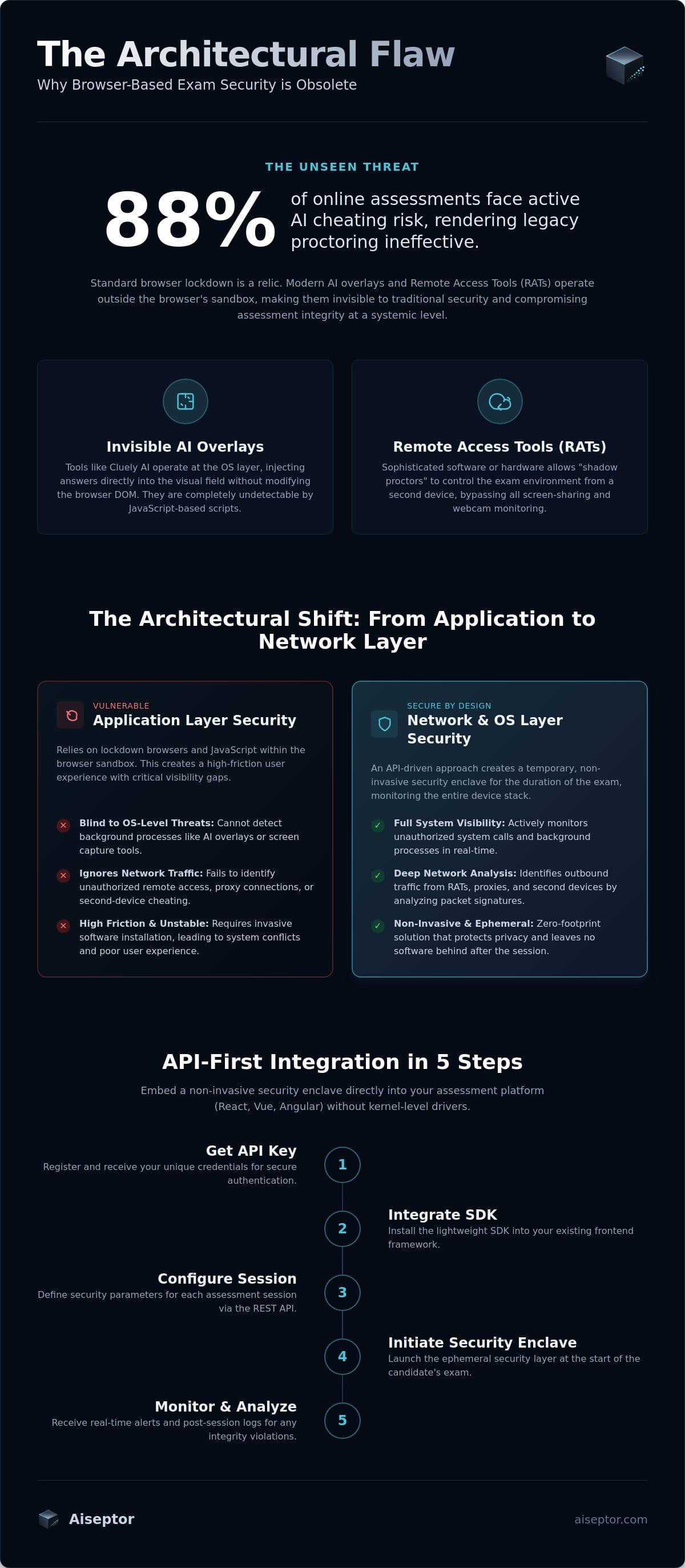
88% of online assessments now face an active AI cheating risk, according to Talview's 2026 AI Threat Index. If you're building or operating an assessment platform, the tool most of your customers already trust, a lockdown browser, was not built to see where that risk actually lives. It secures a browser window. Modern cheating tools don't run in one.
Here's why browser-based proctoring is structurally blind to invisible AI overlays and on-device LLMs, and what a network-layer exam security API actually needs to do about it.
Key Takeaways
- Invisible AI overlays and on-device LLMs run as separate OS-layer processes. A browser sandbox, by design, can't query the OS or inspect the network stack, so it never sees either one.
- Network-layer enforcement closes the gap by controlling what the candidate's device can reach during the session, rather than trying to observe the candidate more closely.
- Aiseptor integrates via a REST API: create a session, redirect the candidate, and receive signed webhooks for the rest of the session lifecycle.
- Most integrations are running in production in under a business day, with no changes to your existing assessment UI.
Why Browser-Based Proctoring Can't See This
A browser sandbox is restricted to its own tab by design. It can't enumerate other processes, read the network stack, or query hardware state, restrictions that exist to protect users from malicious websites, not to weaken security. That same restriction is what makes browser-based proctoring blind to the tools candidates use now.
Invisible AI Overlays
An invisible AI overlay like Cluely renders answers on a transparent layer marked excluded from screen-capture APIs. It never modifies the browser's DOM and never appears in a screen recording, so a tool that only watches either surface has nothing to flag. Detecting it requires operating at the OS layer where the overlay actually runs.
On-Device LLMs
A language model running locally (Ollama, LM Studio, a custom inference binary) makes no request to a known AI provider's API, so anything watching only for outbound calls to OpenAI or Anthropic sees nothing. Catching it requires OS-level signals: active inference processes, GPU memory deltas, model files present on disk.
What Network-Layer Enforcement Does Instead
Rather than trying to identify these tools by process name, which loses to a renamed binary or an open-source fork within the hour, network-layer exam security enforces a default-deny policy on the candidate's device: only the assessment platform and any resources it explicitly allows are reachable for the session's duration. AI inference endpoints, remote-access relays, and second-device pivots fail to resolve, regardless of what a tool calls itself.
The enclave is ephemeral. It deploys in about 30 seconds, requires no kernel driver, and removes itself completely when the session ends, with nothing left on the candidate's device. Aiseptor collects network-access signals and device-activity metadata, not webcam, microphone, or keystroke data, with a default 24-hour retention window. This is inherently more privacy-preserving than video proctoring, since it never captures the candidate's physical environment at all.
Integrating the API
The real shape of the integration is simpler than a from-scratch security build: create a session with a single authenticated POST request, redirect the candidate to the URL you get back, and listen for signed webhooks as the session progresses.
- Authenticate. Every request carries a bearer token issued per organization from your dashboard, no separate credential exchange.
- Create a session.
POST /api/v1/sessionswith your own candidate identifier, the exam details, and a callback URL. The response includes anonboarding_urlto redirect the candidate to. - Receive webhooks. Every session event, join, threat detected, verdict ready, ended, is pushed to your callback URL and signed with HMAC-SHA256 so you can verify it actually came from Aiseptor.
See the developer quickstart for the exact request and response fields, the webhook payload shape, and a working signature-verification example. Most integrations are running in production in under a business day; approved partners get the full endpoint reference, an OpenAPI spec, a Node.js SDK, and a staging environment to build against first.
How This Fits With Existing Proctoring
Network-layer enforcement is a complement to identity verification and video proctoring, not a replacement for them. Those tools remain the right layer for physical-room anomalies and confirming who is sitting the exam. Aiseptor covers the layer underneath: the device and network surface where invisible overlays, on-device LLMs, and remote-access tools actually operate. Pricing is usage-based and billed per session, with no seat-based minimums. See Aiseptor for assessment platforms, or request free access to test it against your own integration.
Frequently Asked Questions
Is this compatible with existing video proctoring tools?
Yes. It's designed to run alongside identity verification and behavioral proctoring, covering the device and network layer those tools don't reach, without requiring you to replace your current stack.
Do candidates need to install a permanent agent?
No. The security enclave is session-scoped: it activates when the session starts and removes itself completely once it ends, with nothing persistent left on the device.
How does the API detect invisible overlays like Cluely?
By operating at the OS and network layer where these tools actually run. Because an overlay like Cluely never touches the browser sandbox, detecting it requires visibility a browser-based tool architecturally doesn't have.
Can it block second-device cheating, like using a phone for ChatGPT?
Yes. Aiseptor's network policy applies across every interface on the primary device, so a phone tethered as a hotspot doesn't create an unmonitored path off the exam.
How long does integration take?
Most integrations are running in production in under a business day via the REST API, with no changes to your existing assessment UI.
How is it priced?
Usage-based, billed per session, with no long-term seat commitment required.
Frequently Asked Questions
Is this compatible with existing video proctoring tools?
Yes. It's designed to run alongside identity verification and behavioral proctoring, covering the device and network layer those tools don't reach, without requiring you to replace your current stack.
Do candidates need to install a permanent agent?
No. The security enclave is session-scoped: it activates when the session starts and removes itself completely once it ends, with nothing persistent left on the device.
How does the API detect invisible overlays like Cluely?
By operating at the OS and network layer where these tools actually run. Because an overlay like Cluely never touches the browser sandbox, detecting it requires visibility a browser-based tool architecturally doesn't have.
Can it block second-device cheating, like using a phone for ChatGPT?
Yes. Aiseptor's network policy applies across every interface on the primary device, so a phone tethered as a hotspot doesn't create an unmonitored path off the exam.
How long does integration take?
Most integrations are running in production in under a business day via the REST API, with no changes to your existing assessment UI.
How is it priced?
Usage-based, billed per session, with no long-term seat commitment required.